PECUNIAGROUP
FTE Tracker product mark FTE Trackerby Pecunia Group

In continuous production since 2018

Prove where every federally funded hour went, before anyone asks you to.

FTE Tracker is the time-and-effort system we built for the organizations we serve and still operate today. It documents personnel costs to the standard 2 CFR 200.430(i) actually applies — and it runs in English and Spanish, because the staff logging the hours are the ones who decide whether any of this works.

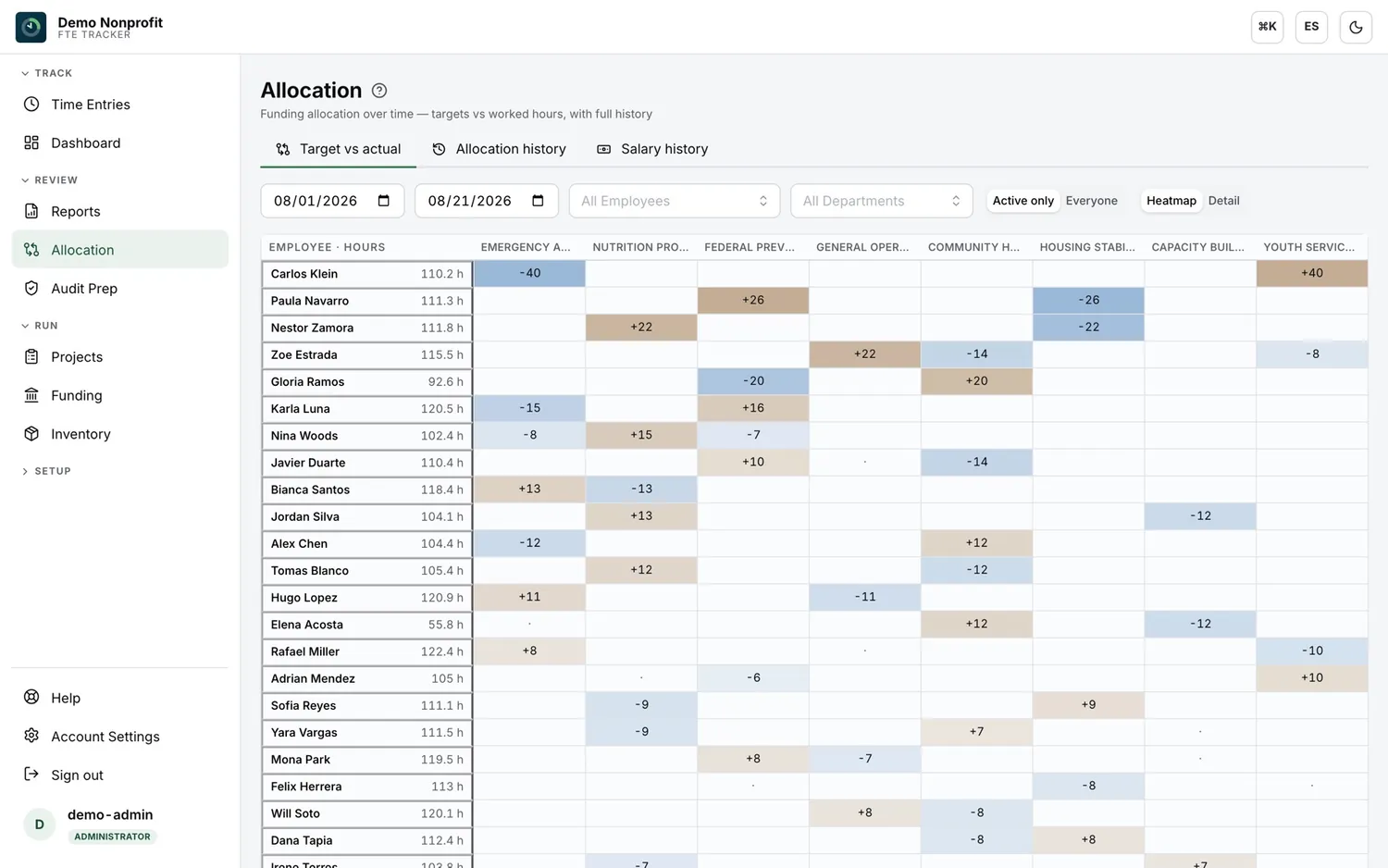
FTE Tracker allocation screen: a heatmap of employees against funding sources, each cell showing how far the hours actually worked drifted from that employee’s funding target.

Every screen on this page is a real capture of FTE Tracker running against a demonstration organization we maintain for exactly this purpose. No client data appears anywhere on this site.

The requirement

The absence of a standard form is not the absence of a standard.

2 CFR 200.430(i) does not ask you for a spreadsheet. It asks you for an internal control system, and then lists what the records that system produces have to do.

The Office of Management and Budget moved away from requiring the Personnel Activity Report and toward requiring that each organization build its own controls. That reads as flexibility. In practice it removed the safe harbour: there is no longer a form you can hold up and say you filled it in correctly.

Budget estimates are still allowed for interim charging. What is not allowed is leaving them there. The estimates have to produce reasonable approximations, significant changes in a person’s actual work have to be identified and adjusted, and there has to be an after-the-fact review that trues the charges up. That review is the step most organizations skip, and it is the step auditors ask about.

If a federal agency decides your records do not meet the criteria, it can require employee activity reports to validate what you already submitted — retroactively, for a period you have already spent and already reported to a funder.

The full walkthrough of the documentation criteria
  1. Comply with your own written accounting policies and practices.
  2. Be supported by an internal control system giving reasonable assurance that the time charged is accurate, allowable and properly allocated.
  3. Be incorporated into the official payroll records of the organization.
  4. Reasonably reflect the total activity the employee is compensated for, not only the federally funded part.
  5. Cover federally assisted and all other compensated activities on an integrated basis.
  6. Distribute the salary of anyone paid from two or more awards, or split between federal and non-federal work.

What it does

Five capabilities, and the screen each one lives in.

Captured from the running platform against a demonstration organization. The names, funds and figures in these screens are synthetic.

01

Logged in the moment, not reconstructed in December.

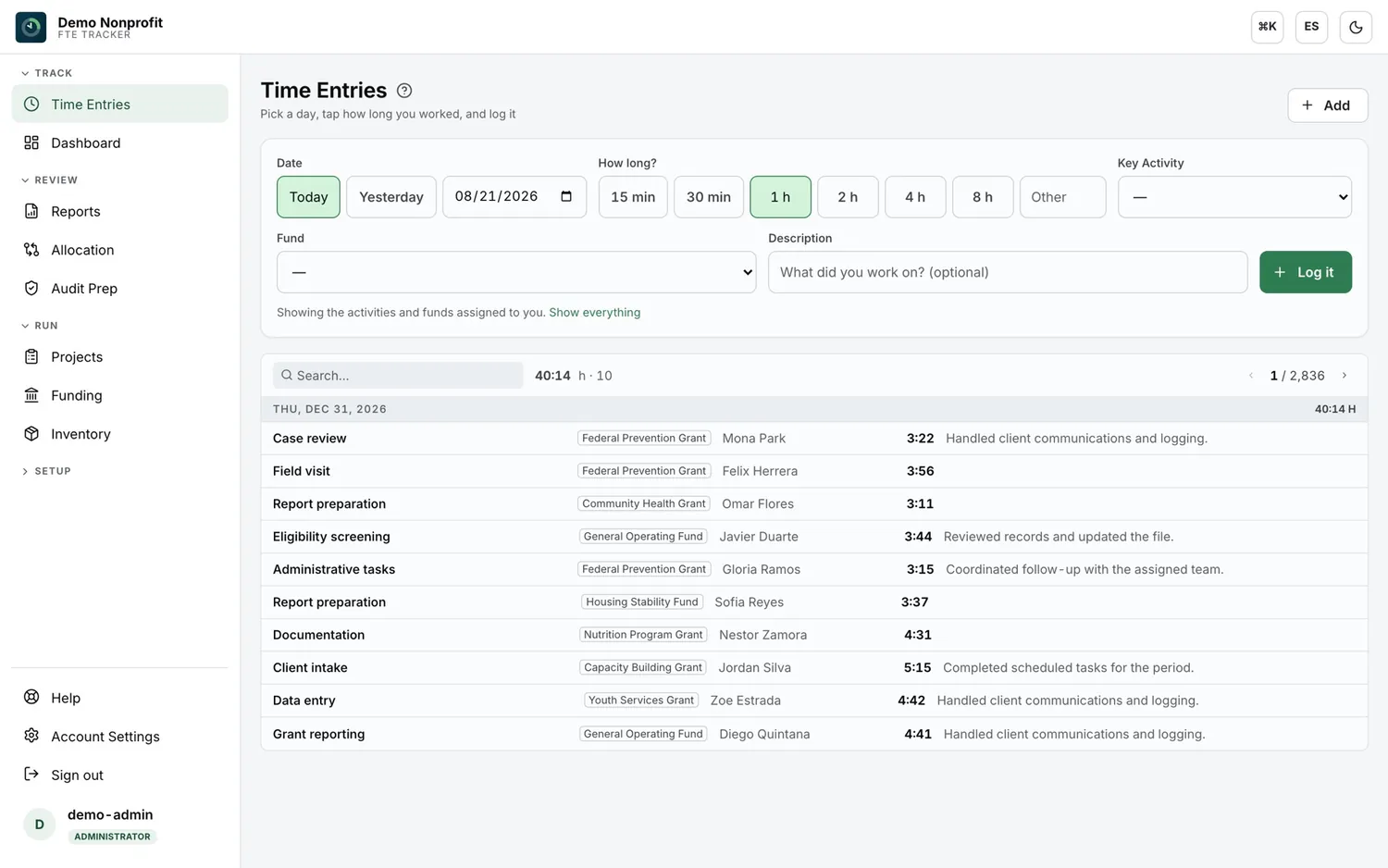
Staff pick a day, tap how long they worked, and choose the fund and key activity it belongs to. The form defaults to the funds and activities assigned to that person, so the common case is three taps. Leave, holidays and sick time are logged the same way, which is what keeps the record complete enough to reflect total compensated activity.

FTE Tracker time entry screen: a date and duration picker above a list of logged entries, each tagged with an employee, a fund and a key activity.

02

Hours by fund, by activity, and by leave — filtered the way the question was asked.

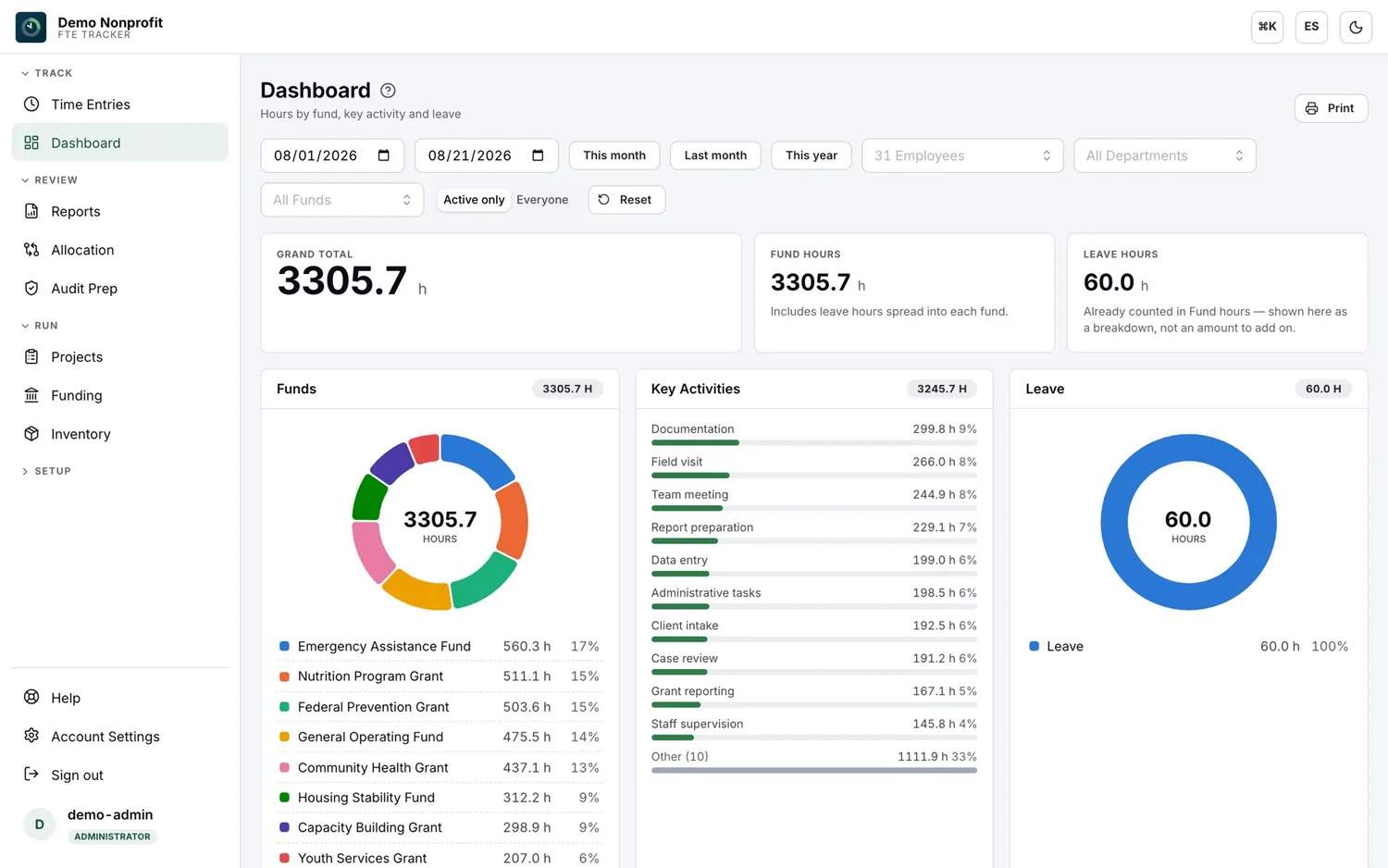
Date range, employee, department and fund, with leave broken out rather than double counted. Finance can answer “how much of this person’s time belongs to this award this quarter” without rebuilding it from the payroll register, and print the view that answers it.

FTE Tracker dashboard: grand total hours, a funds donut chart with per-fund hours and percentages, a ranked key-activity breakdown, and a leave chart.

03

The sample request arrives as a list of names. This exports as a list of names.

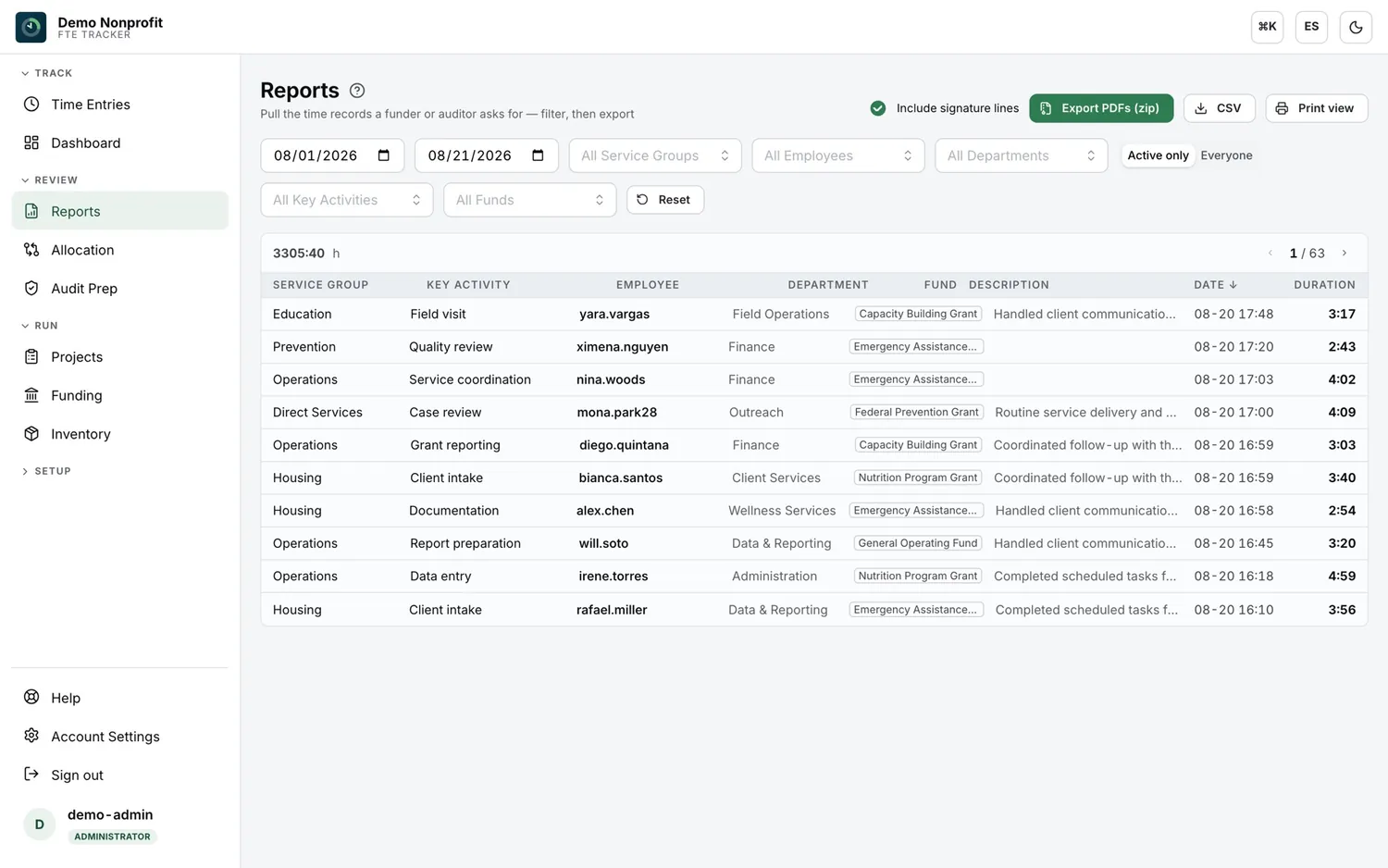
Filter to the period, the department, the fund or the people the request names, then export one PDF per employee as a single zip, with signature lines if your policy requires them. CSV and a print view come off the same filter. That is the difference between a two-hour response and a two-week one.

FTE Tracker reports screen: filter row for dates, service group, employee, department, activity and fund, above a table of time records, with export buttons for zipped PDFs, CSV and print.

04

Labor priced from the salary history, not from today’s rate.

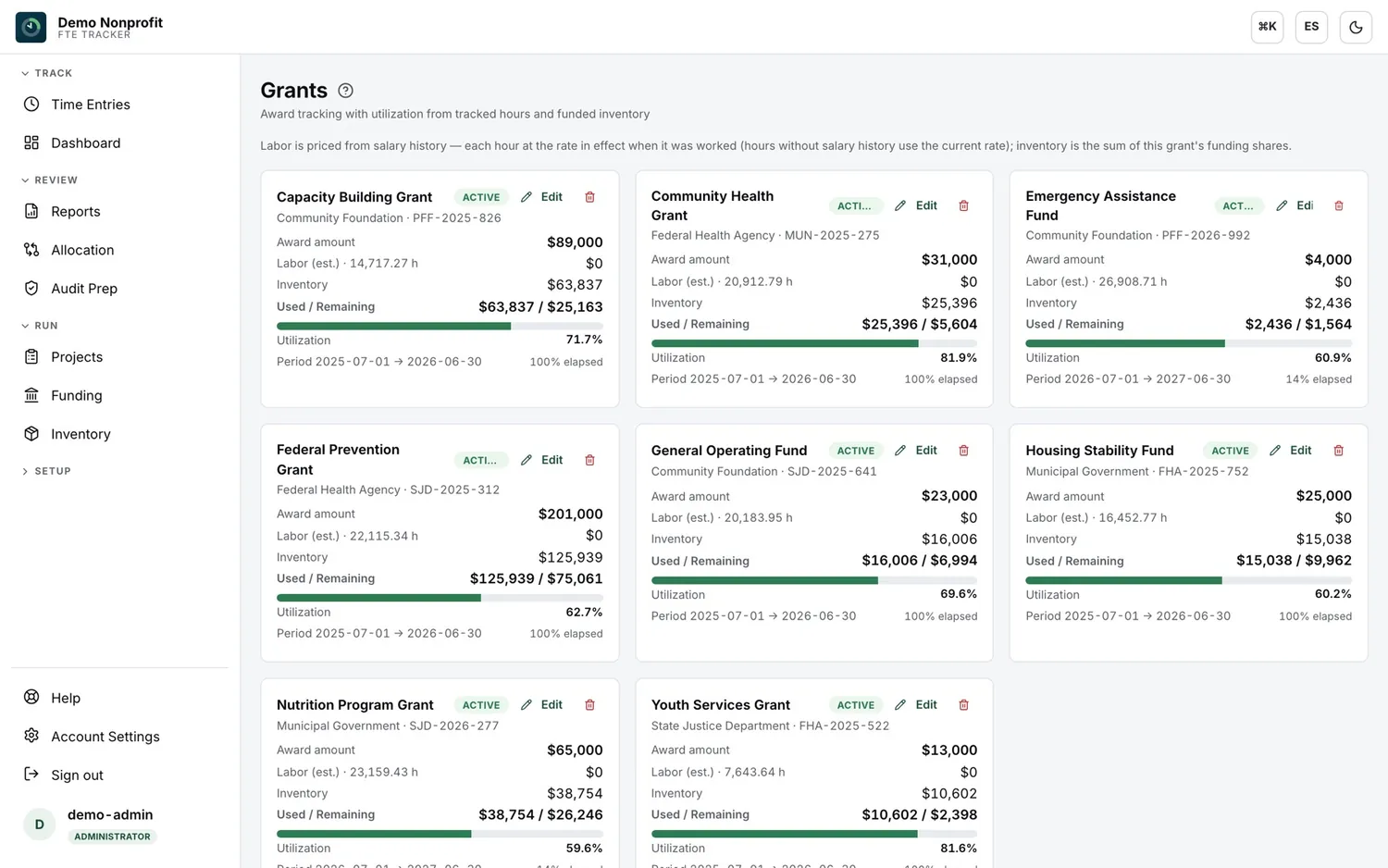
Each award carries its funder, award number, period and amount, with utilization read from tracked hours and funded inventory. Hours become dollars at the rate that was in effect on the day the work happened, so a raise mid-period does not quietly restate a year of charges. Percent elapsed sits beside percent used, which is the comparison a program officer makes first.

FTE Tracker grants screen: one card per award showing funder, award number, award amount, estimated labor, inventory, used and remaining, a utilization bar and the award period.

05

Equipment three funders paid for, depreciated three ways.

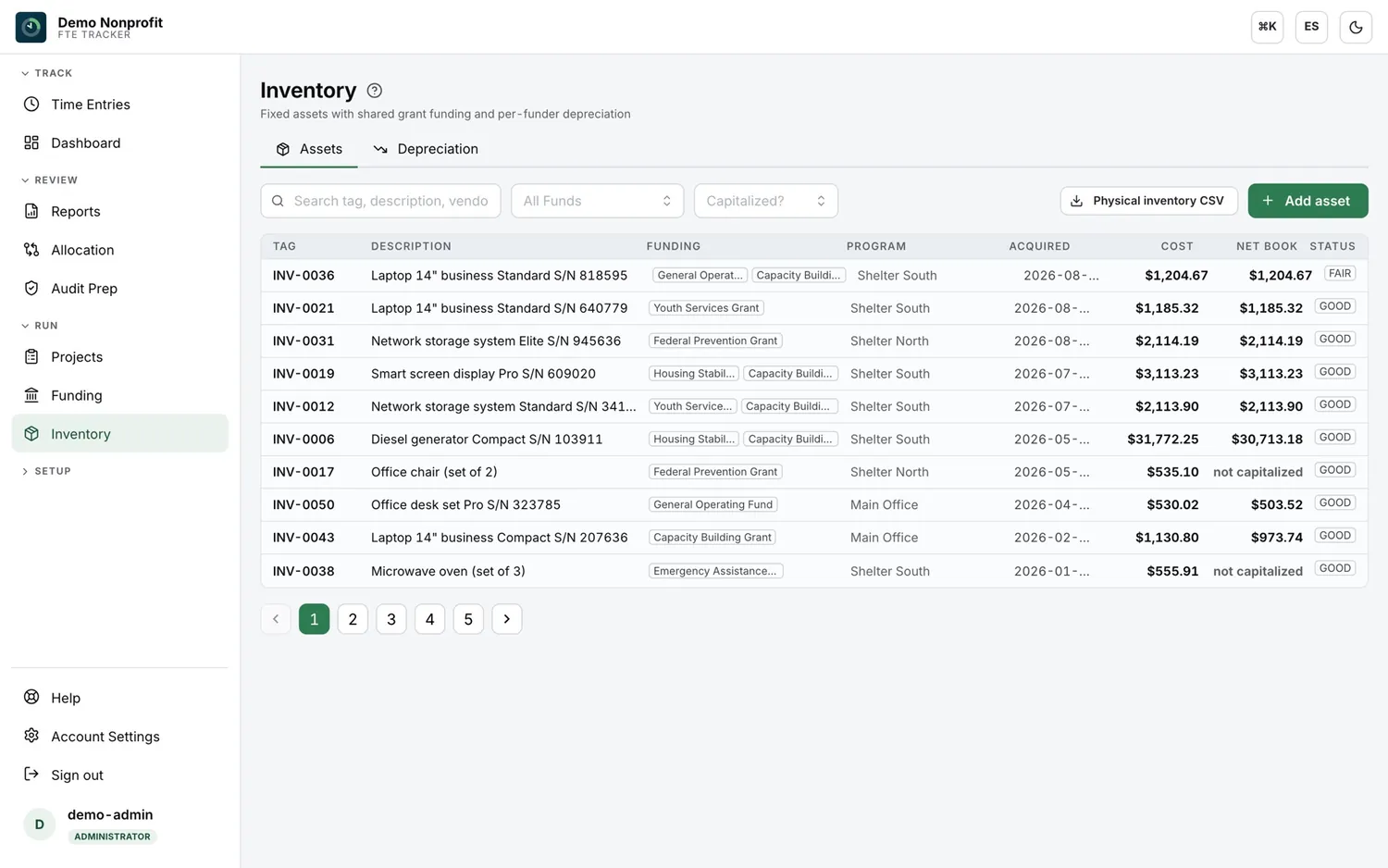
Split-funded assets are a routine finding and a routine spreadsheet error. Each asset carries its funding shares, its acquisition date, its cost and its net book value, with straight-line depreciation tracked per funder and a physical inventory CSV for the count someone has to do with a clipboard.

FTE Tracker inventory screen: a fixed-asset register with tag, description, funding sources, program, acquisition date, cost, net book value and condition.

Audit preparation

The readiness checks, run a year before fieldwork instead of a week after it.

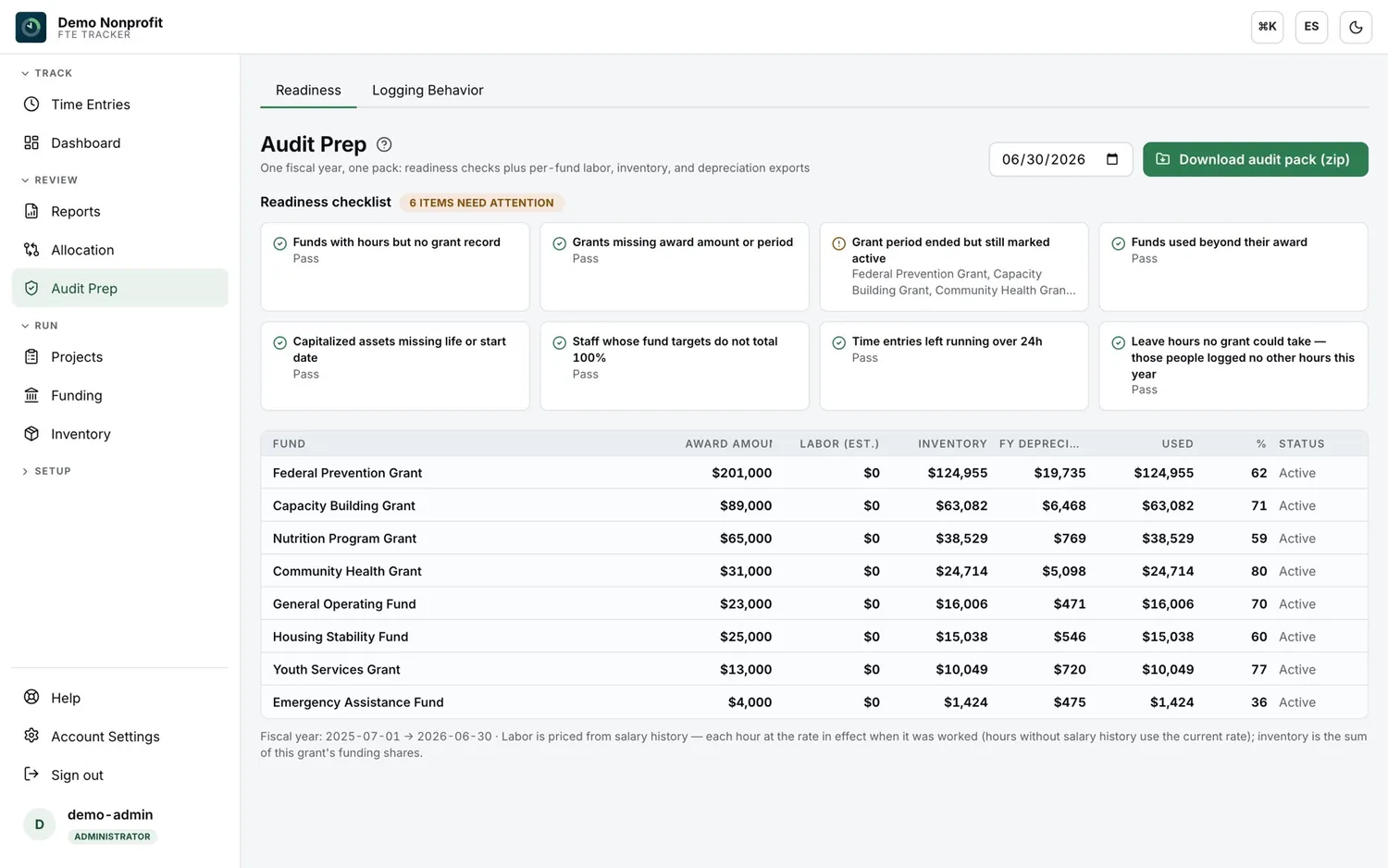
Pick a fiscal year and the system runs the checks an auditor would run, then packages the evidence behind them.

FTE Tracker audit prep screen: a readiness checklist of eight checks with pass and attention states, above a per-fund table of award amount, labor, inventory, depreciation and amount used.

01

Checks that name the problem

Funds carrying hours with no award record. Grants missing an amount or a period. Award periods that ended but are still open for charging. Staff whose fund targets do not total 100%. Entries left running past 24 hours. Leave hours no award could take.


02

The evidence behind each figure

Per fund: award amount, labor priced from salary history, funded inventory, depreciation for the year, and the resulting utilization. Not a summary of the numbers — the exports the numbers were built from.

03

One pack, one fiscal year

Labor, inventory and depreciation export together as a single zip against the fiscal year you select. It is meant to be handed over, opened, and read without a call.

We prepare you for the audit; an independent CPA firm performs it. We cannot be both, and you don’t want a firm that offers to be.

A corridor in a community health and social services building, staff moving between program rooms.

Who this is for

The hours being documented were worked here, not in the finance office.

Fit

Built for organizations paying staff out of more than one award.

If none of the lines on the left describe you, the honest answer is that your payroll register is already the evidence.

  • You receive federal funds, directly or passed through another entity.
  • At least some salaries are split across two or more awards, or between federal and non-federal work.
  • That split lives today in a spreadsheet, on paper, or nowhere.
  • You have had a time-and-effort finding, or you have a Single Audit on the calendar and would rather not.
  • Your fiscal staff need grant-level cost visibility without rebuilding it by hand each month.
  • Some of your staff work in Spanish and some in English, and the system has to work for both.

When we say no

If every employee is charged one hundred percent to a single award and never moves, you do not need this and we will tell you so on the call. FTE Tracker is also not a time clock for scheduling and attendance. It is a documentation system for award allocation.

Getting started

What actually happens after you sign.

Three stages and a habit. We do the configuration with you rather than handing over an empty system.

Staff at a training session working through a system walkthrough on laptops.
  1. M0

    Setup

    We load your real structure: funds and awards with their periods and amounts, projects, departments, key activities, employees and their funding targets. This is where it is decided whether the system will serve you, because the structure has to match the one your accounting already uses.

  2. M1

    Staff onboarding

    Staff are trained on entry, corrections, leave and special days, and password resets, with short video walkthroughs in Spanish and English that stay with your organization for whoever joins later. Fiscal staff are trained separately, on the review side.

  3. W4–8

    Parallel running

    You run the new record alongside whatever you do today. This is the part organizations want to skip and should not: it is how you find out that a department has been charging time to a closed award, before an auditor finds out.

  4. Ongoing

    Daily entry takes a staff member a couple of minutes. The recurring cost is finance’s review — which is the internal control the regulation asks for, and the reason the system is worth having. Product support runs through tracker@pecuniagroup.com, and organizations already running it sign in at ftetracker.pecuniagroup.com.

The failure mode is adoption, and it is measurable.

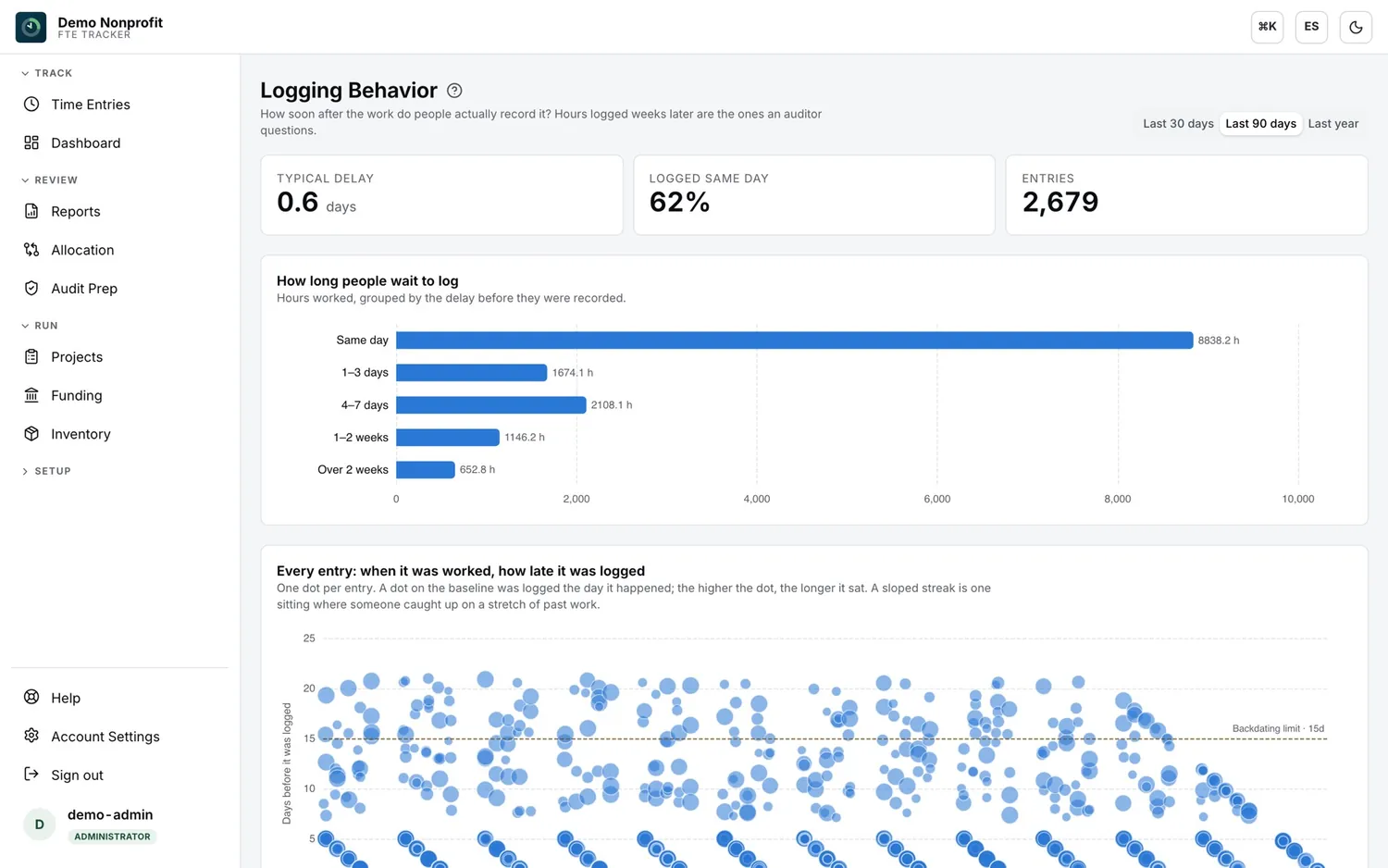
These projects do not fail on the software. They fail because people log a month of work in one sitting, and hours recorded weeks after the fact are exactly the hours an auditor questions. The logging behavior view puts a number on it: typical delay, share logged the same day, and one dot per entry so a catch-up streak is visible as a sloped line. Fifteen chronic late loggers is a training problem you can fix in a week.

FTE Tracker logging behavior screen: typical delay and same-day share, a bar chart of hours grouped by how long they waited to be logged, and a scatter plot of every entry against its logging delay.

Questions

Asked before every demo.

Is this only for Puerto Rico organizations?

No. The requirement is federal — 2 CFR Part 200 applies to any U.S. organization spending federal awards. Our production deployments are at federally funded Puerto Rico nonprofits, and the platform and the training run in English and Spanish.

Does the platform run in Spanish?

Yes, and so does the training. Staff switch the interface language themselves; the reports and exports follow. This matters more than it sounds: the point where time-and-effort systems fail is not the software, it is staff who do not log, and people log faster in the language they think in.

Does it replace our payroll system?

No, it feeds it. FTE Tracker documents how hours split across funds and activities and prices them from salary history. That allocation is what should drive how payroll charges those hours to your awards.

Will this satisfy our auditor on its own?

It produces records that meet the 2 CFR 200.430(i) documentation criteria. What no software can supply is your organization’s own written policy and the after-the-fact review that trues up interim charges. We help you build both. Without them, no tool passes.

What happens to our data if we leave?

You export it, and you can do it yourself before the conversation ever comes up. Time records export as CSV or as one PDF per employee; the audit pack exports as a zip per fiscal year; inventory exports as a physical-count CSV. These records are audit evidence with a retention period attached, and leaving a vendor should never destroy them.

Do we have to be a Pecunia Group consulting client?

No. FTE Tracker is sold on its own, and organizations regularly start here and never buy anything else.

Can we see it before we commit?

Yes. A demo is a live walkthrough of the running platform with your own grant structure as the example — not a slide deck, and not a sign-in page with no credentials behind it.

See it running before you decide.

Thirty minutes on the live platform, with your own funds and your own split-funded people as the example. Bring the last management letter if you have one — the fastest version of this conversation starts from a finding somebody already wrote down.

Product questions go to tracker@pecuniagroup.com.

Or call the Puerto Rico office: +1 (787) 241-9147